The flagship
Every business.
Every property.
Every dollar.
One screen.
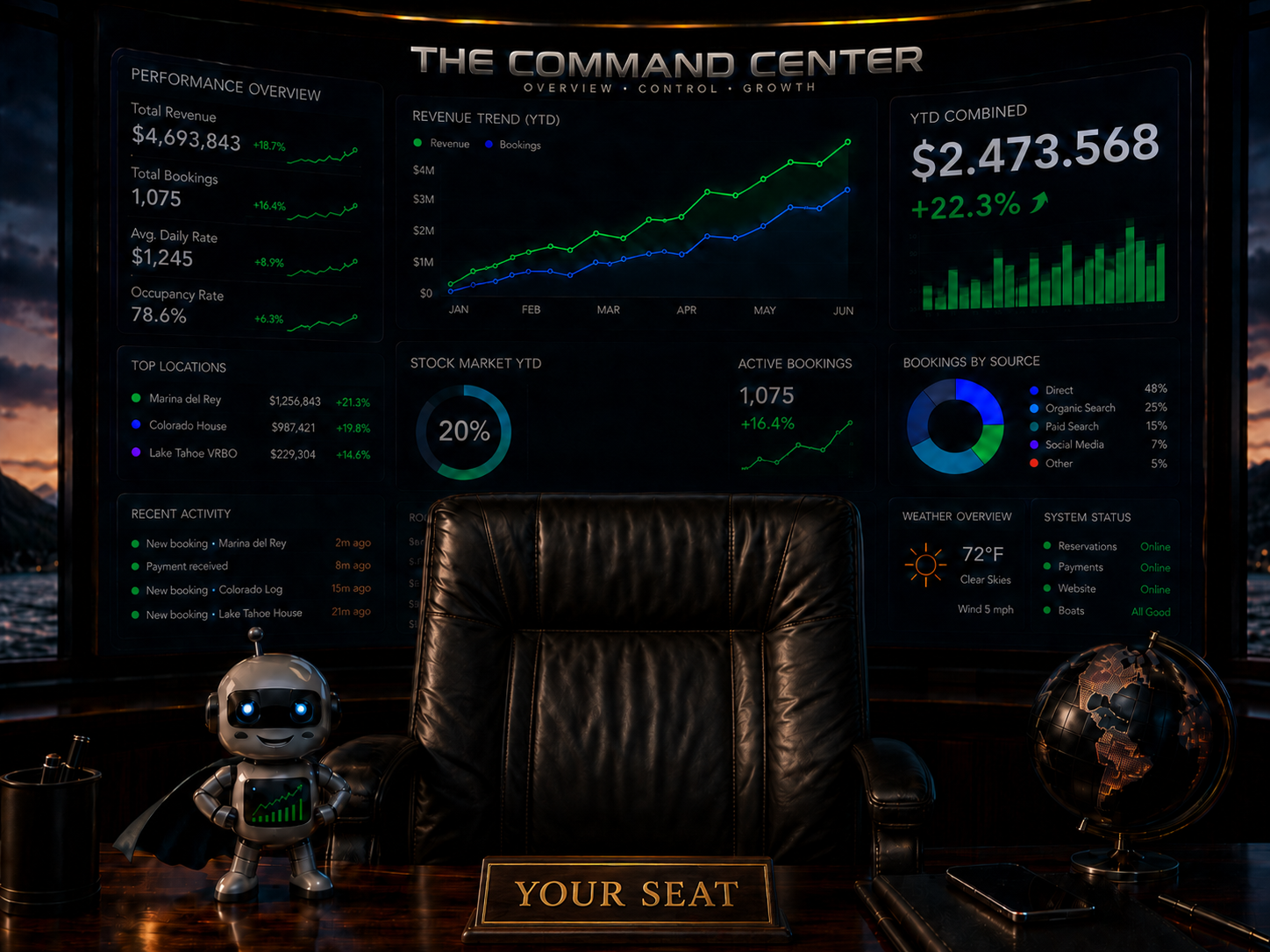
The private command center for owners who run more than one thing. Your managers run their branches and feed the numbers. You open your phone and see the whole empire live.
What it is
A private dashboard for everything you own.
The Command Center is an owner's dashboard: one private screen that consolidates every company, property and rental you control into a single live view, with each entity one click below it. It is built for owners who run more than one thing and currently reconstruct their real position from several systems, a bookkeeper and a group chat. It is our flagship build and it is in active development — we are shaping the first version with a small number of owners rather than shipping a guess.
It replaces the monthly ritual: exporting from each company's books, rebuilding a spreadsheet, asking three managers for numbers that are already a week old. Managers keep working inside their own scope and feed their branch; you open your phone and see the whole position.
Every Command Center is bespoke, because no two portfolios are shaped the same way. If you own multiple businesses or properties, a consult is the way in — early conversations directly influence what we build first.
What you see
The whole empire, live.
- One P&L across every company
- Your properties and rentals, live
- Managers see their branch. You see everything.
- Alerts the moment a number moves.
Built around you
Assembled for your exact holdings.
Every Command Center is bespoke. Companies, rentals, fleets, brokerages, funds — whatever you own, we wire in. No two clients see the same dashboard, because no two portfolios are the same.
White-glove
Everything is handled.
- Full hosting and SSL — nothing to manage.
- AI executive assistant on standby.
- AI customer-support bots for each of your businesses.
- Private onboarding directly with the studio principal.
Capabilities
What the first version is being built to do.
The Command Center is in active development. This is the capability set we are building, shaped by conversations with owners running real portfolios.
Consolidated view
Every entity you own rolled into one position — revenue, cost, cash and margin — with each company or property one click below it.
Entity drill-down
Open any single business, property or rental and see its own numbers without leaving the dashboard or opening another system.
Manager inputs
Branch managers feed their own numbers inside their own scope, so the owner view stays current without the owner chasing anyone.
Role separation
Row-level permissions mean a manager sees their branch and only their branch. The consolidated picture belongs to the owner.
Movement alerts
Thresholds you set — a margin slipping, occupancy dropping, an expense spiking — surfaced the moment the number moves, not at month end.
Phone-first
The same view on a phone as on a desk. Built to be checked in ninety seconds between meetings.
Bespoke structure
Companies, rentals, fleets, brokerages and funds are modelled the way you actually hold them, including entities that don't fit a template.
AI executive assistant
An assistant grounded in your own data that answers questions about your portfolio in plain language instead of making you build a report.
Signal Trader add-on
The optional Signal Trader module, sold separately and available exclusively to Command Center owners.
Who it's for
Owners who run more than one thing.
This is a narrow product on purpose. These are the owners we are building the first version with.
Multi-company owners
Two or more operating businesses, each with its own books and its own manager, and no single place that shows the combined position.
Property portfolio owners
Rentals, vacation properties or commercial holdings across entities, where occupancy, cost and cash live in separate systems.
Family and holding structures
An owner or family office with managers underneath, who needs delegation to keep working while retaining one honest view of everything.
Integrations and stack
What it's built with, honestly.
No vapour. This is the architecture the flagship is being built on and the plain truth about what it can connect to.
The stack
React front end, Postgres with row-level security, serverless functions, managed hosting and SSL. Nothing for you to install, maintain or patch.
Data sources
Anything that exposes an API or a scheduled export — accounting platforms, banking exports, booking and property systems, and our own products. What is reachable for your specific stack is confirmed in scoping before it is promised.
Manual by design where needed
Where a source has no usable feed, managers enter the handful of numbers that matter in a structured form. A clean weekly input beats a broken integration.
AI layer
Current large language models grounded strictly in your own portfolio data. Your figures answer your questions; they are not used to train public models.
How pricing works
Scoped to your business, not to a plan tier.
There is no price list, because there is no standard build. The Command Center is scoped to your business: how many companies and properties you hold, how they are structured, how many managers need scoped access, which systems have to feed it, and how deep the AI assistance goes.
Everything we ship is custom made to each client's need — not the same thing for all. A one-owner operation and a multi-office organization get different systems, different timelines and different numbers. Hosting, SSL, the AI assistant and the AI customer-support bot are included in every engagement.
The fastest way to a real number is a short call. We walk your operation, agree on what belongs in phase one, and put a fixed scope and price in writing before anything gets built.
Questions
Frequently asked questions.
- What is an owner's command center?
- An owner's command center is a single private dashboard that consolidates every business, property and account an owner controls into one live view. Instead of logging into separate systems for each company, the owner sees revenue, costs, occupancy and cash in one place, with the detail one click away. It is built for the person who owns the whole picture, not for a department.
- Can I see multiple LLCs, properties and businesses in one dashboard?
- That is the core design. Each entity keeps its own books and its own manager, and The Command Center rolls them up into a consolidated view with per-entity drill-down. You can look at one property, one company, or everything at once. The structure is modelled on your actual holdings during the build.
- How is this different from a spreadsheet or QuickBooks dashboards?
- A spreadsheet is a snapshot someone has to maintain, and accounting dashboards show you accounting — usually one company at a time, after the fact. The Command Center is built to sit above your operations and your books, pulling operational numbers alongside financial ones across every entity you own. It is your structure, not a chart of accounts someone else designed.
- Is my financial data secure?
- Security is designed in, not added later. Data sits in an isolated Postgres database with row-level security, so a branch manager can only reach their own entity while the owner sees everything. Access is authenticated per person and revocable, transport is encrypted, and hosting and SSL are managed by us. Your data is never used to train public AI models.
- When is The Command Center available?
- It is in active development as our flagship build and is not generally available yet. We are working with a small number of owners to shape the first version around real portfolios rather than guesses. If you own multiple businesses or properties, book a consult — early conversations directly influence what gets built first.
- Who is it built for?
- Owners who run more than one thing: several companies, a property portfolio, an operating business plus rentals, or a family holding structure with managers underneath. If your net position lives in four systems and three inboxes, you are who this is for. A single-business owner with one clean system usually does not need it.
- Do my managers get access?
- Yes, scoped. Managers work inside their own branch or property and feed the numbers as part of their normal week; they see their scope and nothing else. The consolidated owner view is yours alone. Roles are defined with you during the build so the boundaries match how you already delegate.
- How is it built and what can it connect to?
- It is a modern web system — React front end, Postgres with row-level security, serverless functions, managed hosting and SSL — reachable on your phone and desktop. It connects to sources that expose data through APIs or scheduled exports, such as accounting platforms, banking exports, booking systems and our own products. What is technically reachable for your specific stack is confirmed during scoping, before anything is promised.

Optional add-on
Signal Trader — the first sentient broker you can talk to.
AI committee trading signals with built-in risk guardrails. Available only as an optional add-on for The Command Center — exclusively.
Explore Signal TraderIncludes full hosting, SSL, AI assistant and AI customer-support bot.
Let's talk
Request a private
Command Center demo.
Cinematic, tailored to your exact holdings. 30 minutes with the studio principal.